
Building on the pioneers together means someone's factory shouldn't stall because the host logged off. DedicatedMC runs your Satisfactory world headless on dedicated hardware chosen for clock speed, so the belts keep moving as your build scales into thousands of machines. Manage mods with the Satisfactory Mod Manager, drop in shared blueprints, tune advanced game settings and let automatic replication guard your saves.
Satisfactory is deceptively demanding to host. Its simulation ticks every belt, splitter, merger, machine and logistics path, and that work is heavily single-thread bound — so as your factory grows from a starter smelter line into a continent-spanning industrial complex, the bottleneck is per-core clock speed, not core count. That's exactly why our Satisfactory nodes run on high-clock AMD Ryzen and Intel Core CPUs. A headless dedicated server also lifts the simulation off any one player's machine: it runs 24/7, keeps producing while everyone is offline, and never depends on a host staying connected the way an in-game session does.
The Satisfactory modding scene runs on ficsit.app and the Satisfactory Mod Manager (SMM). On a dedicated server, mods are installed into the server's mods folder, and each pioneer installs the matching mods and versions locally through SMM so client and server stay in lockstep. Our direct file access makes assembling and updating that server-side mod set painless — no wrestling with a stock panel that hides the filesystem.
Blueprints designed in the Blueprint Designer are saved as files, which means you can share a proven manufacturing block with the whole server by dropping the blueprint file in place. On a persistent dedicated save, that turns collaborative megabase construction into something a team can genuinely divide and conquer.
Advanced Game Settings let you bend the rules of a world — remove unlock costs, boost resource sink coupons, enable flight, or switch off the arachnid creatures for anyone who'd rather not meet them. These options are tied to the save and chosen when a session is created, and because you manage saves directly on the server you can keep a tweaked sandbox world alongside a standard playthrough. Save files upload, download and swap through the panel's file manager, giving you full ownership of every world you run, from a quick experimental sandbox to your main hundred-hour save.
Satisfactory play is a long game — hundreds of hours of routing, rebuilding and optimising — and a bold refactor of a main bus shouldn't put all of it at risk. Automatic replication runs across every plan, and you can trigger a manual backup before tearing down a factory block, then restore in moments if the redesign doesn't pan out. Add DDoS protection and publicly verifiable node monitoring, and you get a Satisfactory server that stays online, stays fast, and keeps your save safe while you build.
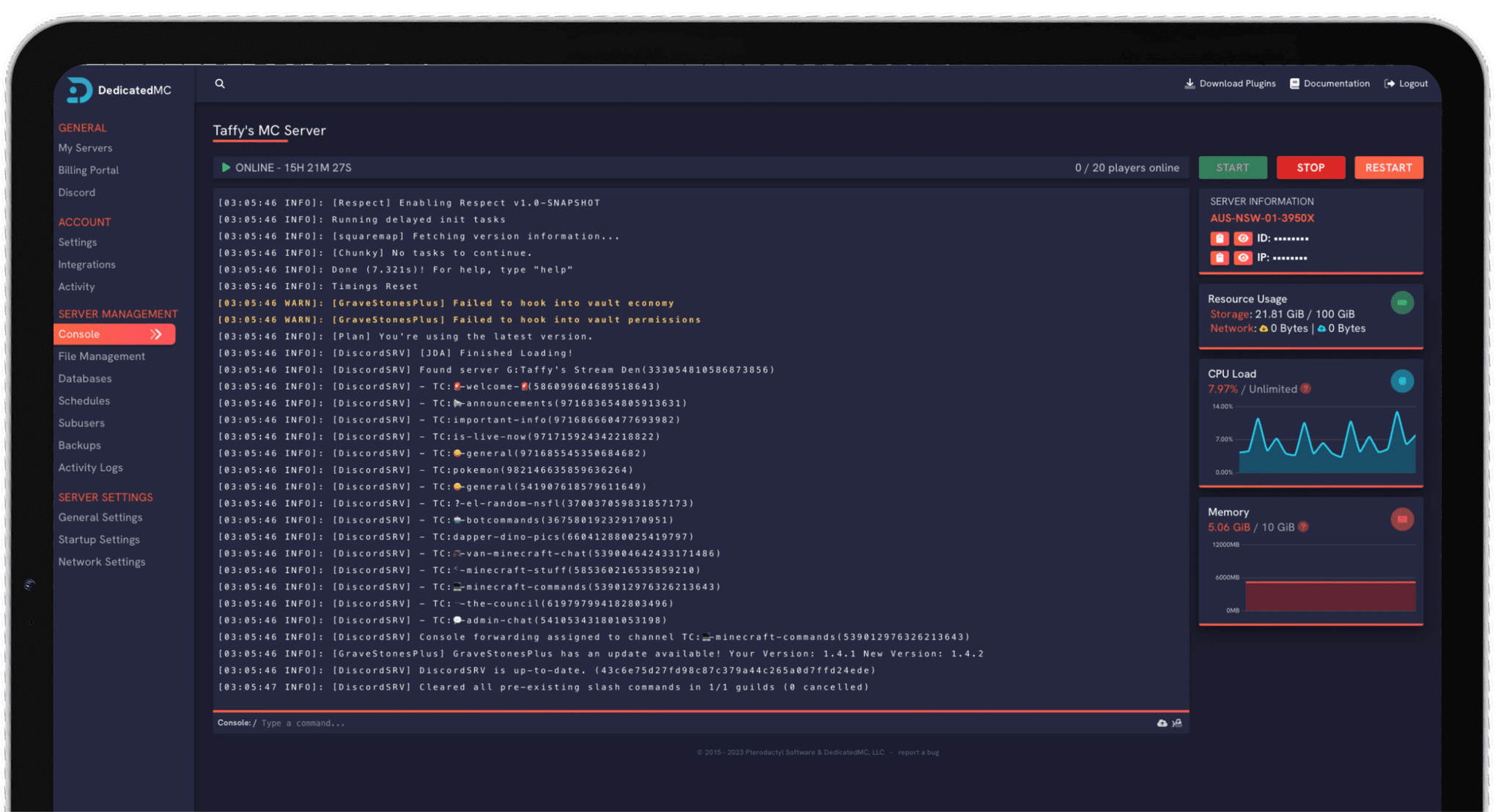
Running a Satisfactory dedicated server well means touching the filesystem — mod folders, save directories, server settings and the odd config edit — and our in-house panel gives you all of it without opening a support ticket. The file manager handles uploads, swaps and downloads; scheduled tasks cover automatic restarts and timed commands so the server maintains itself; subusers let a co-owner manage the world without your full credentials; and the built-in importer moves an existing Satisfactory server across for you. Real-time CPU and memory graphs sit right in the panel, so as your factory scales you can watch exactly how much headroom your tick rate has left — and verify our node health publicly on Grafana rather than taking a marketing claim on faith. When the day comes to migrate a mega-factory to fresh hardware or roll out a mod update across the whole team, that visibility and file-level control turn what would be a fragile, ticket-driven process on most hosts into something you run yourself in a few minutes, save intact and pioneers back online.
I've loved this service since I left my old host. I never found a decent provider until this one. They have amazing support and have never let me down, even when I've had serious issues. Their plans are very affordable and for the quality you get I don't think anything beats it. I've used their service for around 4 years now and will continue to be a loyal customer.
Service and customer support? Fantastic. I've never had a single issue with my server they haven't been able to help with. The servers are always running well and their customer support is equally as good — quick, helpful, patient and most importantly very transparent. If there are any issues, they will most definitely be there to help you.
Best company hands down. Their support team is friendly, fast, and incredibly helpful — especially through Discord where you can easily open a ticket. They offer features that some competitors charge extra for, and they genuinely help with server issues without any hassle.
Been with DedicatedMC for just under a year now and have yet to have an issue. I've never had problems with downtime or their support — it's by far the best in the space. They reply almost instantly and are always happy to help.
Switching hosts usually means a weekend of zipping files and hoping nothing breaks. Our importer handles the whole migration automatically — free, on every plan.
Open the importer in your panel and tell it where your current server lives. That's the only thing we need from you.
Worlds, plugins, mods and configs transfer automatically. No zipping files, no FTP client, no support ticket.
Your server comes up on our hardware with everything where you left it. Update your players' IP and you're done.
Unusual setup? Ask on Discordand we'll do it by hand.
Satisfactory's factory simulation is heavily single-thread bound — every belt, splitter, machine and logistics path is ticked on a small number of cores. As a mega-factory grows into thousands of machines, per-core clock speed matters far more than core count, which is why our nodes lean on high-clock AMD Ryzen and Intel Core CPUs to hold the tick rate steady.
No. A Satisfactory dedicated server runs headless on our hardware 24/7, independent of your game client. The factory keeps producing and the world stays available whether or not anyone is connected, and no player has to act as host — a big step up from an in-game session tied to one PC.
Satisfactory mods are managed through the Satisfactory Mod Manager (SMM), which pulls from ficsit.app. Server-side mods are installed into the server's mods folder, and every connecting player installs the same mods and versions locally through SMM. Our full file access makes lining up the server mod set straightforward.
Yes. Blueprints are saved as files you build with the Blueprint Designer, and because the panel gives you direct file access you can drop shared blueprint files onto the server or hand them between players. Combined with a persistent dedicated save, that makes collaborative factory building much easier.
Yes. Advanced Game Settings — things like no unlock cost, faster resource sink points, flight, or disabling arachnid creatures — are stored with the save and can be enabled when a session is created. You manage saves directly on the server, so you can run a settings-tweaked world alongside a standard one.
The dedicated server keeps its own set of save files, which you can upload, download, swap or roll back through the panel's file manager. Automatic replication runs on every plan and you can take a manual backup before a major refactor, so an experimental redesign of your factory never risks the whole save.
Yes. Bringing a world across is a matter of uploading your .sav file to the server's save directory, or giving our team your current host's SFTP credentials and letting us migrate everything — save, mods and configs — across for free.